At a glance
Read-only
Access wherever possible

Defensive and advisory
A security review of your Microsoft 365 tenant and Azure subscriptions across identity, mail, sharing, devices, privilege, networking, secrets and logging, read-only wherever possible.
Fixed scope
Microsoft 365 and Azure security review
Fixed scope, priced before the work starts.
Findings and a remediation plan.
At a glance
Access wherever possible
At a glance
Findings report and remediation plan
At a glance
CyberCert public registry
Overview
The review reads the tenant configuration directly: which identities hold privileged roles, which resources accept traffic from the internet, where credentials are stored, and which logs are kept long enough to investigate an incident. Each finding is tied to the Azure control that closes it.
Findings are prioritised by the risk they create in your environment and mapped to the Azure controls required to address them.
Black Shard runs production workloads on Azure in Australian regions, among them Aurii, the clinical software platform the firm built and operates, with each practice's data kept apart and no long-lived credential in a release pipeline. Client tenants are reviewed against the same configuration decisions.
Azure security is divided under Microsoft's shared responsibility model. Microsoft secures the physical datacentres, hosts and network the platform runs on. The customer always keeps responsibility for its data, its accounts and identities, and the devices that connect, whichever Azure services it deploys.
The customer side is largely configuration: which identities hold privileged roles, which resources accept traffic from the internet, where credentials are stored, and which logs are kept long enough to investigate an incident. Defender for Cloud and Azure Policy report on that configuration. The review reads it directly and weighs each permission and exposure against what the tenant runs.
Each area is assessed against what the tenant runs, who touches it, and what an attacker positioned inside it could reach.
Microsoft 365 and Azure share one Entra ID tenant, so the review reads identity once and reports on both sides of it. On the Microsoft 365 side it reads the settings that decide how far one compromised mailbox or one shared link can carry.
The same checks, setting by setting, are in the Microsoft 365 security review checklist for a team that runs them in house. Where identity needs a review of its own, the Entra ID security review goes deeper into conditional access, privileged roles, app consent and offboarding.

Two documents. The findings report records where the tenant stands, with each finding manually verified and the evidence to reproduce it.
The remediation plan lists what to change, in what order, using controls the tenant already licenses: Entra ID conditional access, Azure Policy, Key Vault, private endpoints, diagnostic settings, and Defender for Cloud where it applies.
Findings are ordered by the risk they create in the environment, so remediation starts with the changes that remove the most exposure. The plan is written for the team that will do the work.
The same patterns recur. Privilege accretes: an Owner assignment handed out during a migration is still there years later, attached to an account nobody has reviewed. Service principals carry client secrets that never expire, created before workload identity federation was available.
Secrets drift out of Key Vault into app settings, pipeline variables and the occasional repository.
On the network side, storage accounts keep public network access because an integration needed it once. Legacy authentication stays enabled for one workload nobody can name. Diagnostic settings were never configured, so when something happens the activity log has aged out and there is nothing to investigate. Underneath sits ambiguous ownership: a tenant stood up by a partner who has since moved on, with nobody inside the organisation holding the whole picture.
The common triggers are a migration into Azure that moved faster than its access model, a tenant built by a partner who has since moved on, a customer security questionnaire or insurer renewal that asks about cloud configuration, an Essential Eight or ISO 27001 programme that needs the cloud estate measured, and the weeks after an incident when the question is what else is exposed.
Organisations running Microsoft 365 alongside Azure usually take the two together, since the identity plane is shared. The review reads Entra ID once and reports on both sides of the tenant from it.
Every assessment follows the same sequence. The timeframe is fixed in writing at scoping and depends on the subscriptions, environments and workloads in scope.
Black Shard holds SMB1001:2026 Gold, issued by CyberCert. Its own estate is at Essential Eight Maturity Level 3, assessed September 2026.
Scoping records the tenancy layout, the workloads that matter and the obligations the organisation carries. Access is read-only wherever possible: typically Global Reader in Entra ID and Reader at the relevant subscription scopes, agreed at scoping and removed when the engagement ends.
The timeframe is agreed before work starts, and the review is delivered remotely. It runs as a one-off assessment or as the opening of an ongoing advisory arrangement. Remediation can follow as advisory support or hands-on engineering.
The six areas break down into specific checks. Each one is read against the tenant as configured on the day, with the result recorded as a finding, a confirmed control or a gap in coverage.

A Microsoft 365 and Azure security review runs to a fixed scope, priced in writing before the work starts, with a written findings report and a remediation plan.
Effort is driven by the number of subscriptions and environments, the workload running in the tenant, and the size of the identity estate: users, service principals and privileged roles.
Scope, timeframe and deliverable are agreed before any work starts, on a free 30-minute scoping call or from a brief to info@blackshard.com.au with the shape of the environment.

Legal
The firm runs intake, conflicts, trust oversight and AML/CTF from one portal.
Whole-tenant ICT, with Conditional Access across the firm from 23 October 2026.

Health
The clinical site and the practice’s ICT now sit with one team.
Hosting, ICT management and security now run under one ongoing engagement.

Property
Every valuation, from inspection to invoice, runs through The Den.
Reports, sketch PDFs and fees come from the same job record in The Den.
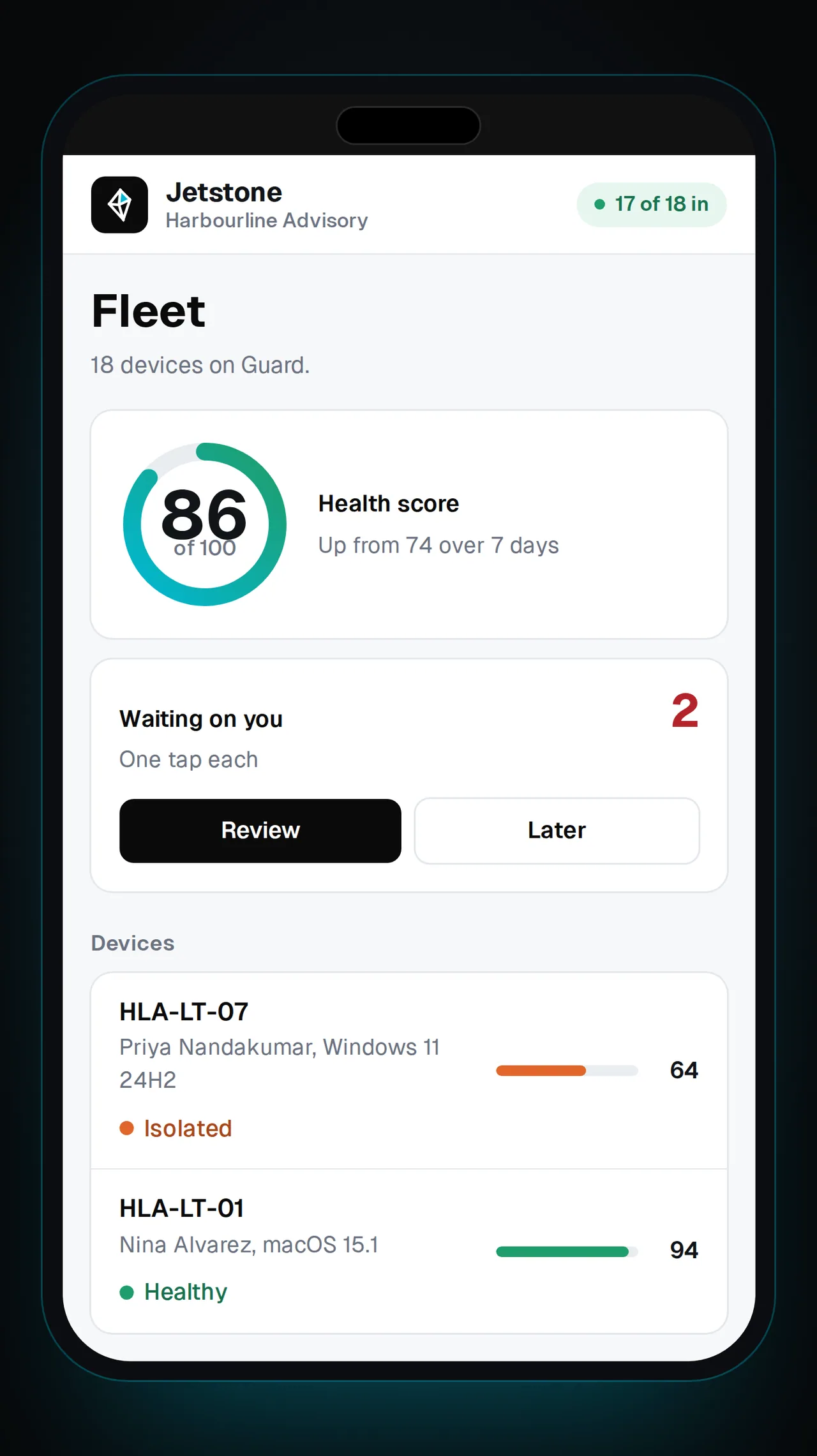
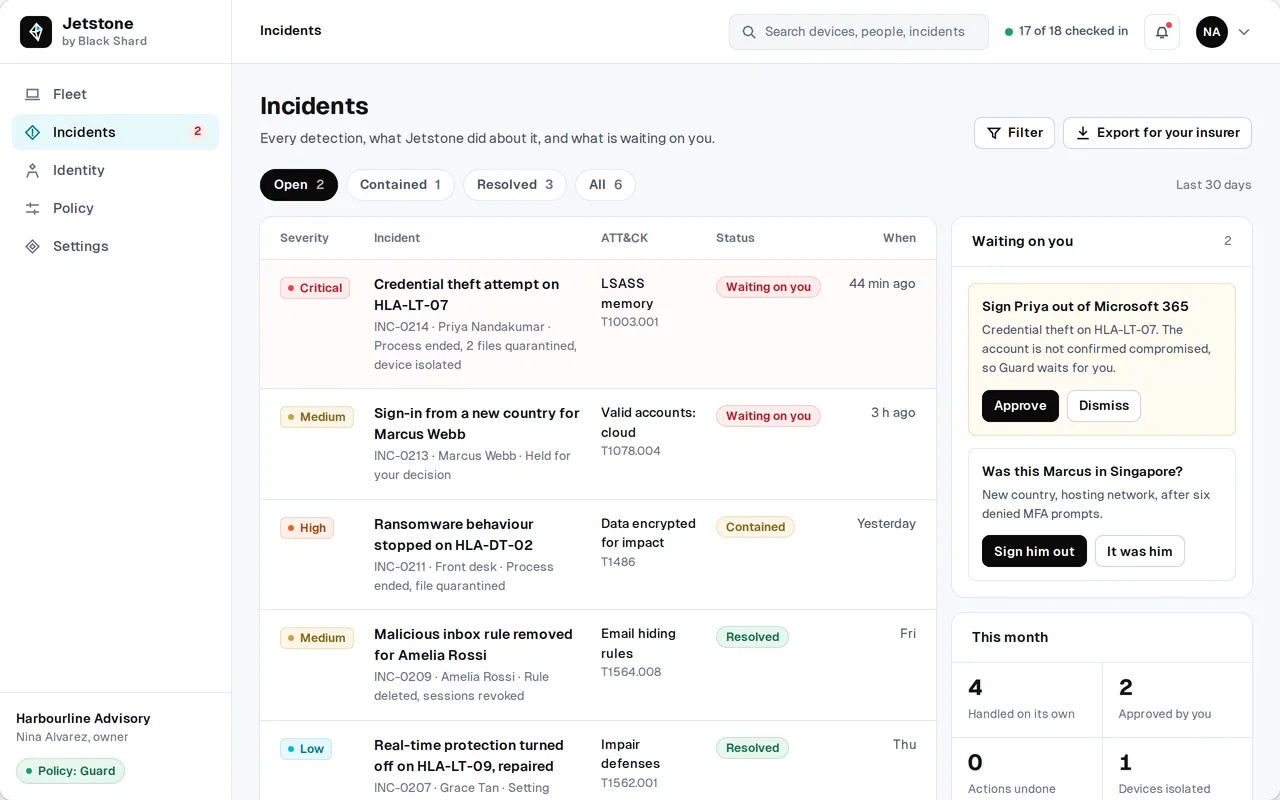
Product screens shown with sample data.
Launching 2027
Designed for Australian businesses with 1 to 200 devices.
On a high-confidence detection, Jetstone is designed to act on its own against threats on a published list: end the process, quarantine the file, isolate the device, or sign the user out of Microsoft 365 or Google Workspace.
Identity watch will flag impossible travel, MFA fatigue, malicious inbox rules and risky OAuth consents.
Every automatic action will be undoable in one tap.
From the newsroom


Updated Guides
An Azure security assessment is a structured review of how a Microsoft Azure tenant is configured: who holds privilege in Entra ID and on subscriptions, what is exposed to the internet, where secrets are stored, and whether logging is in place to investigate an incident. It ends in a findings report and a remediation plan ordered by risk.
A Microsoft 365 and Azure security review from Black Shard runs to a fixed scope with a written findings report and a remediation plan. The price is set by the number of subscriptions and environments, the workloads in the tenant and the size of the identity estate, and is agreed before work starts.
Six areas, assessed against what the tenant runs: identity in Entra ID, privilege at subscription scope, networking and internet exposure, secrets and Key Vault, logging and retention, and workload configuration. The review produces a findings report with each finding manually verified, and a remediation plan ordered by risk.
Reader-level roles scoped to the review: typically Global Reader in Entra ID and Reader at the relevant subscription scopes, agreed at scoping and removed when the engagement ends. Write access is not required to run a review.
The review runs as a fixed-scope engagement, with the target, timeframe and deliverable agreed before work starts. Subscriptions, environments and workload count drive the effort; a single-subscription tenant reviews faster than a multi-subscription estate.
No. It is an engineering review of the tenant and carries no certificate, and it works against the ASD Essential Eight as a framework. If certification is the goal, the review's findings feed compliance readiness work.
An Azure security assessment reads the tenant's configuration with read-only roles and establishes who holds privilege, what the control plane exposes to the internet and whether telemetry is collected. A penetration test attempts to exploit what is reachable and shows whether a control holds against a real attempt. Where a finding needs that proof before it is rated, the assessment flags it for a live test, which Black Shard also runs.
Secure score is read as part of the review. It does not judge whether a permission is proportionate to its purpose, whether an exposure is deliberate, or whether anyone would act on an alert. The review adds that judgement.
Yes. Entra ID is the identity control plane of the tenant, so privileged roles, conditional access, service principals and their credentials are in scope by default. Where the Microsoft 365 identity estate needs examining on its own, the Entra ID security review is the deeper engagement.
Yes. Black Shard is a software engineering firm as well as a cybersecurity firm, so remediation can run as advisory support or hands-on engineering after the review. The plan is also written so your own team can execute it.
Yes. The entry offer is a Microsoft 365 and Azure security review, because both sit on the same Entra ID tenant. Mail flow and forwarding, SharePoint and OneDrive sharing, guest access, device compliance and audit retention are read alongside the Azure subscriptions wherever the organisation runs them.
Book the free 30-minute scoping call, or send a brief with the number of subscriptions, the main workloads and any deadline. The scope, timeframe and price are confirmed in writing, and the review starts once read-only access is granted.